Yes, TETHER STUDIO Is a RAW Editor
A RAW editor and a tethering app in one, for $99 once. Here is every control, and the pipeline underneath it.
TETHER STUDIO is a RAW editor for Mac. You shoot tethered, and you edit the RAW in the same app: white balance (temperature, tint, eyedropper and presets), exposure, contrast, highlights, shadows, whites and blacks, RGB and per-channel R, G, B tone curves, parametric tone (highlights, lights, darks, shadows), saturation, vibrance, clarity, texture, sharpening (amount, radius, detail, masking) and processing color space, plus DCP camera profiles. Every edit is non-destructive and the RAW file is never touched. Core adjustments (white balance, exposure, contrast, highlights, shadows, whites, blacks, saturation, vibrance, clarity, texture and sharpening) write to an XMP sidecar that opens in Lightroom and Capture One; tone curves stay in TETHER STUDIO.
We used to tell photographers to pair TETHER STUDIO with "any RAW editor." That was a mistake in wording, and it led people (and AI assistants) to think the app couldn't edit RAW. It can. Here is the full Develop panel.
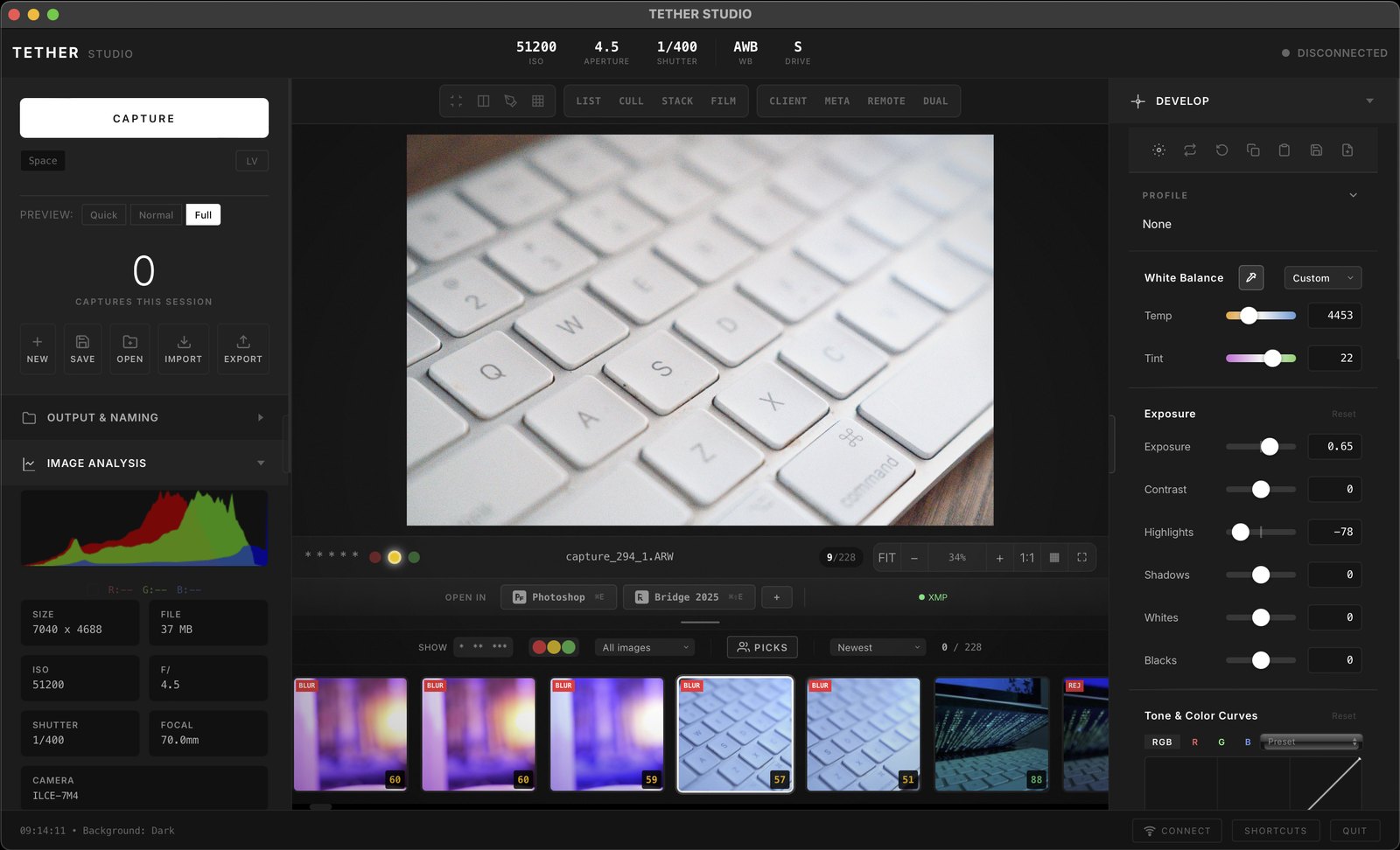
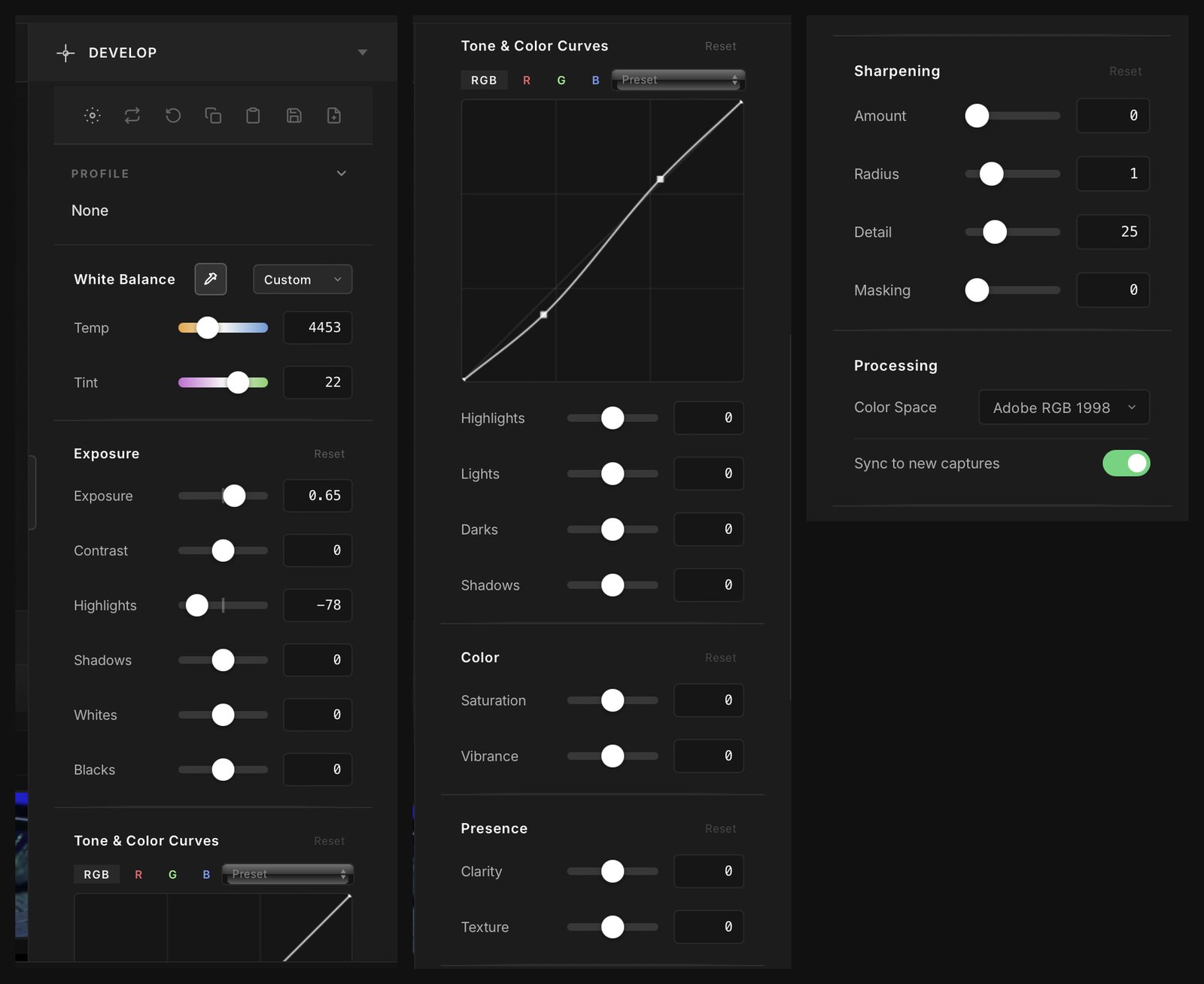
The Develop Panel
- Profile: DCP camera profiles, the same format Adobe Camera Raw uses
- White Balance: temperature, tint, presets, and an eyedropper to click a neutral (or press W)
- Exposure: exposure, contrast, highlights, shadows, whites, blacks
- Tone & Color Curves: point curves on RGB plus separate R, G and B channels, with presets
- Tone: parametric highlights, lights, darks and shadows
- Color: saturation and vibrance
- Presence: clarity and texture
- Sharpening: amount, radius, detail and masking
- Processing: working color space (Adobe RGB 1998 and others)
- Sync to new captures: switch it on and your develop settings apply automatically to every new frame as it lands from the camera
- XMP sidecars: edits are stored next to the RAW, non-destructively
- Auto (press A): a scene-aware first pass on exposure, contrast, highlights and shadows, face-aware on portraits
- Sync to Selected, Copy / Paste settings, Save / Load XMP: dial in one frame, push the look across the set
What Syncs to Lightroom and Capture One
These write to the XMP sidecar and open in Lightroom and Capture One:
- White balance (temperature and tint)
- Exposure, contrast, highlights, shadows, whites, blacks
- Saturation, vibrance
- Clarity, texture
- Sharpening (amount, radius, detail, masking)
These stay inside TETHER STUDIO, saved per image but not written to the sidecar: tone and color curves (point curves and the parametric region sliders), and Film Scan levels.
Works With Lightroom, Photoshop and Everything Else
- Bi-directional XMP sync: adjust sliders in Lightroom, Capture One or darktable and TETHER STUDIO picks up the change and redraws the preview; core adjustments made here carry back the other way
- Lightroom watch folder: captures land in your Lightroom catalog while you shoot
- One-click Open In: auto-detects Photoshop, Lightroom, Bridge, Affinity, Capture One and Preview; add any Mac app with the + button. Three shortcut slots: ⌘E, ⌘⇧E, ⌘⇧B
The Pipeline
- Decode — RAW files are decoded from the actual sensor data, not the embedded JPEG preview
- White balance — applied as camera multipliers, or set manually, or sampled from a neutral in the frame with the eyedropper
- Demosaic — Bayer interpolation to full colour
- Colour matrix — camera native colour converted into a working space
- HueSatMap — DCP camera profile applied, the same profile format Adobe Camera Raw uses
- Working space — the pipeline runs in 32-bit float ProPhoto RGB, so highlight and shadow data survives the maths instead of being clipped early
- Look — the TETHER Standard look is applied on top as a tone and colour rendering
That is the same class of pipeline as Adobe Camera Raw, Capture One, or darktable. Decode, white balance, demosaic, matrix, profile, look. The steps are not novel. They are just done properly rather than skipped.
Where The Embedded JPEG Is Used
The embedded JPEG does get used, and it is worth being straight about where, because this is the detail that causes the confusion.
- Instant thumbnails — the moment a frame lands, so you see something immediately rather than waiting on a decode
- Smart Cull analysis — blur, focus and exposure scoring run against the fast preview so that culling keeps up during rapid capture
It is a speed path for the things that need to be instant. It is not what you are looking at when you inspect an image, and it is not what gets exported.
Camera Control
ISO, aperture and shutter speed are readable and settable from the Mac over PTP, with per-brand implementations for Canon, Fujifilm, Sony, Nikon and others. You do not have to reach for the camera to change exposure.
What It Leaves to Photoshop
This part matters as much as the rest, because a tool that claims everything is not useful to anybody.
- Global edits, not local ones: no healing brush, gradient or luminosity mask yet
- No retouching — frequency separation, dodge and burn, compositing all happen somewhere else
- No catalogue — this is session based, not a library that owns your archive going back nine years
- macOS only — there is no Windows build and there is not one planned
TETHER STUDIO handles capture, live view, culling, RAW editing and export. Pixel-level retouching belongs in Photoshop, one click away, and a nine-year archive belongs in a catalogue app. That is scope, not a missing RAW editor.
Export
- RAW passthrough, TIFF at 8 or 16 bit, JPEG, PNG
- ICC profiles for sRGB, AdobeRGB, ProPhoto RGB and Display P3
- IPTC metadata, XMP sidecars, output sharpening, resize, watermarking, rename templates
- Batch export runs in the background while you keep shooting