Launching March 2026

Stop paying rent.

I've been a photographer, art director, retoucher. I've sat through the Capture One price hikes. The Adobe ransom notes. The "we're moving to subscription" emails. So I built the app your boss will approve and creatives actually love.

$99
own it forever
50+
features
0
ransom notes
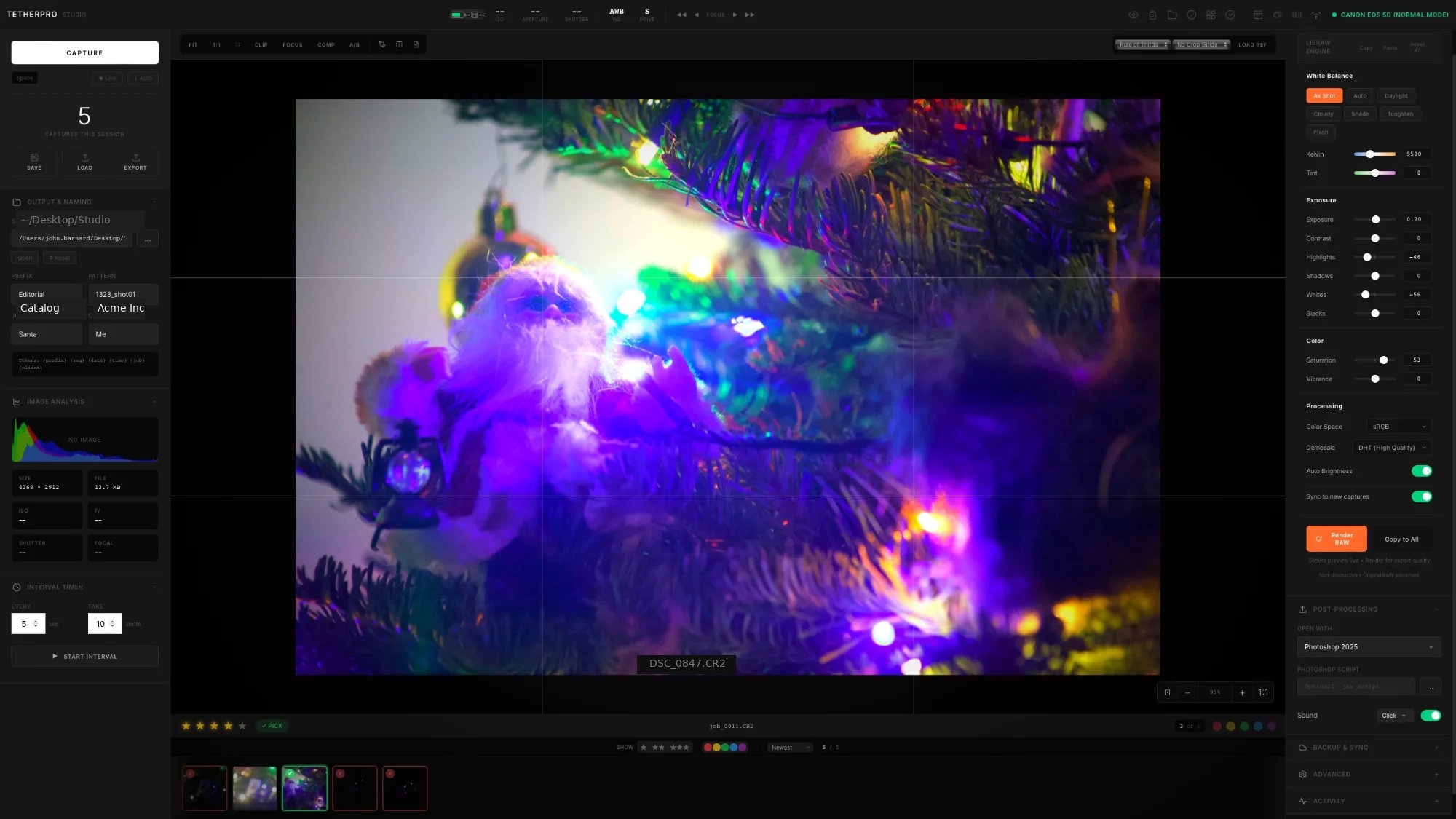
TETHER STUDIO — Professional Tethered Capture

Built by someone who's been in your chair.

I've shot the 12-hour catalog jobs. Sat next to art directors who need to see it NOW. Culled 3,000 images at midnight because the client needs selects by morning.

Then paid the Adobe tax on top of it. TETHER STUDIO is the tool I wish existed.

50+
Features
100%
Offline
2,900+
Cameras
Features

Everything. No tiers. No "Pro" version upsell.

01

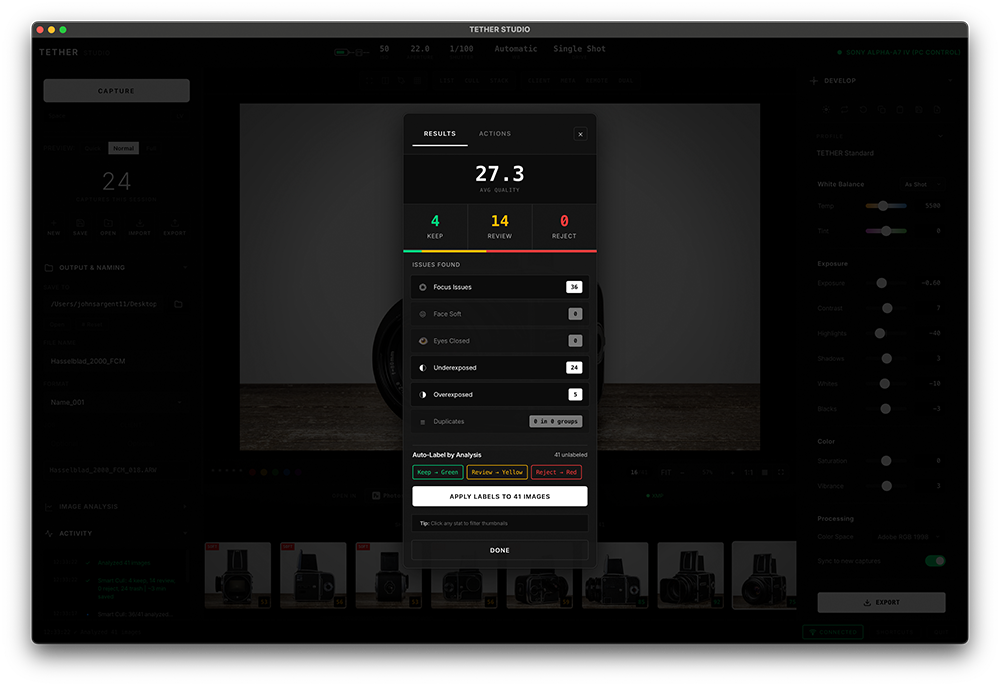
Smart Cull

Cull 3,000 images without uploading a single file to some "AI cloud." Runs 100% on your machine. No API costs. No privacy concerns. Just fast.

⚡ Analysis Complete
127
Keep
48
Review
31
Reject
Filter by Issue
Blurry / Soft 18
Underexposed 7
Overexposed 4
Duplicates 12
Auto-Label by Quality 31 unlabeled
Keep → Green Review → Yellow Reject → Red
02

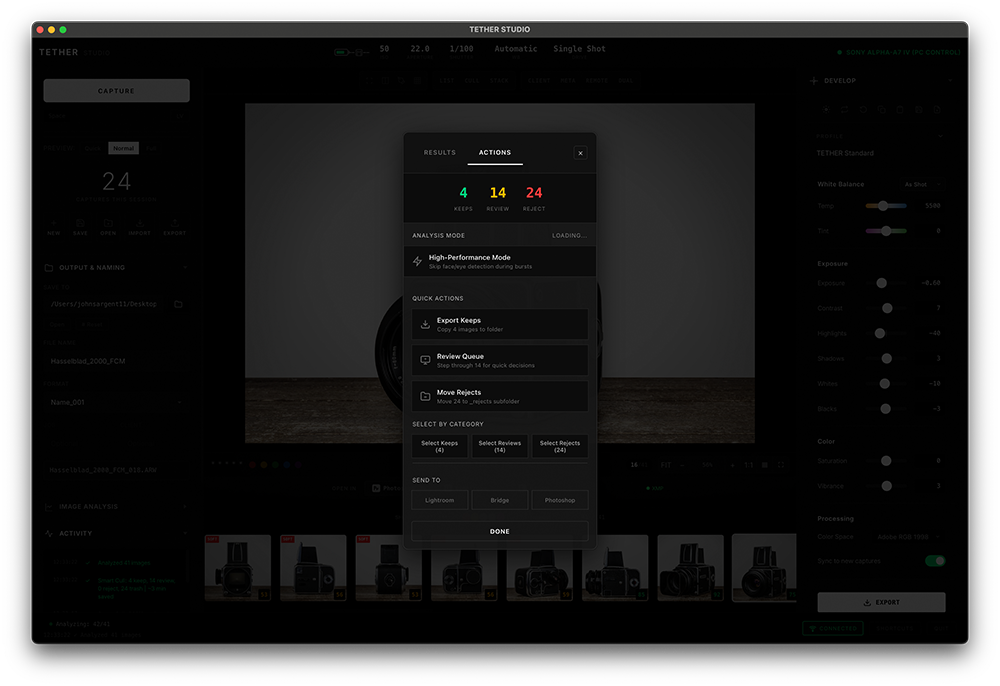
Art Director Mode

For when someone's standing behind you going "can you circle that?" Markup tools, compare views, per-image notes. Make the feedback loop instant.

Fix shadow here
1
2
03

Client View

Press V. Everything disappears except the image. Show clients work without them seeing your Spotify playlist or that folder called "FINAL_FINAL_v3."

V to toggle
DSC_4872.CR3
★★★★★
04

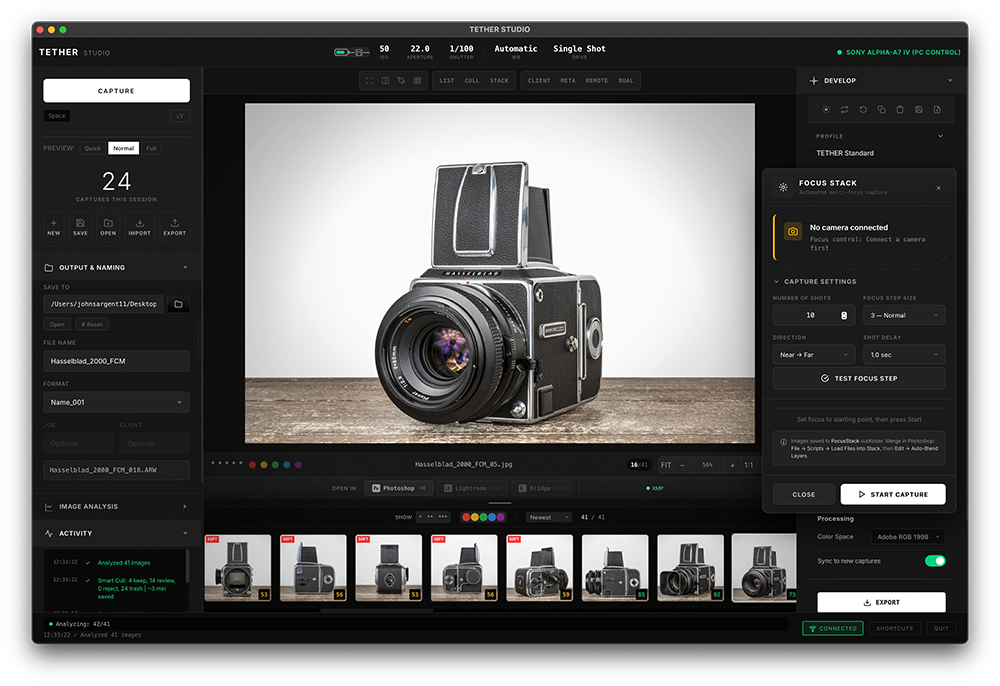
Studio Workflow

The stuff that makes 8-hour shoot days survivable. Session templates you reuse. Shot lists you check off. IPTC that auto-embeds. Dual backup because drives fail.

Shot List 3/8
Hero product shot
White background, centered
12
Detail: label close-up
Macro lens, f/11
8
Lifestyle: kitchen scene
Natural light preferred
15
Package: all SKUs
Grid layout, consistent spacing
Detail: texture shot
Side lighting, high contrast
2,900+
Cameras supported

Built on libgphoto2 and LibRaw. If your camera exists, we probably support it.

🔌
USB/PTP
libgphoto2
📡
WiFi
Canon CCAPI
💾
RAW
LibRaw 1000+
Canon
USB + WiFi (CCAPI)
Nikon
USB / PTP
Sony
USB / PTP
Fujifilm
USB / PTP
Panasonic
USB / PTP
Olympus
USB / PTP
Leica
USB / PTP
Pentax
USB / PTP
The Full List

The part where we ask for money.

50+ features. $99. No asterisks.

Core
  • Live View preview
  • RGB + Luminance histogram
  • EXIF metadata panel
  • Thumbnail strip
  • 1-5 star ratings
  • Color labels (R/Y/G/B/P)
  • Fullscreen mode
  • Custom filename patterns
  • Job/Client/Project fields
  • Grid overlays
  • Aspect ratio guides
  • Reference image overlay
  • Interval timer / timelapse
  • Session auto-save
  • Session resume
  • Native macOS app
Art Director
  • Markup tools (pen, arrow, shapes)
  • Compare view (2/3/4-up)
  • Per-image notes
  • Export with markups
  • Multi-select
  • Approval workflow
  • Client View mode
Camera Control
  • White balance
  • Drive mode
  • Image quality/format
  • Focus mode
  • Bracketing
  • Mirror lockup
Studio
  • Session templates
  • Shot lists
  • IPTC templates
  • Dual backup
  • Watch folder export
  • Overlay templates
  • QC alerts
  • Contact sheet export
  • Focus stacking
  • Barcode/SKU scanner
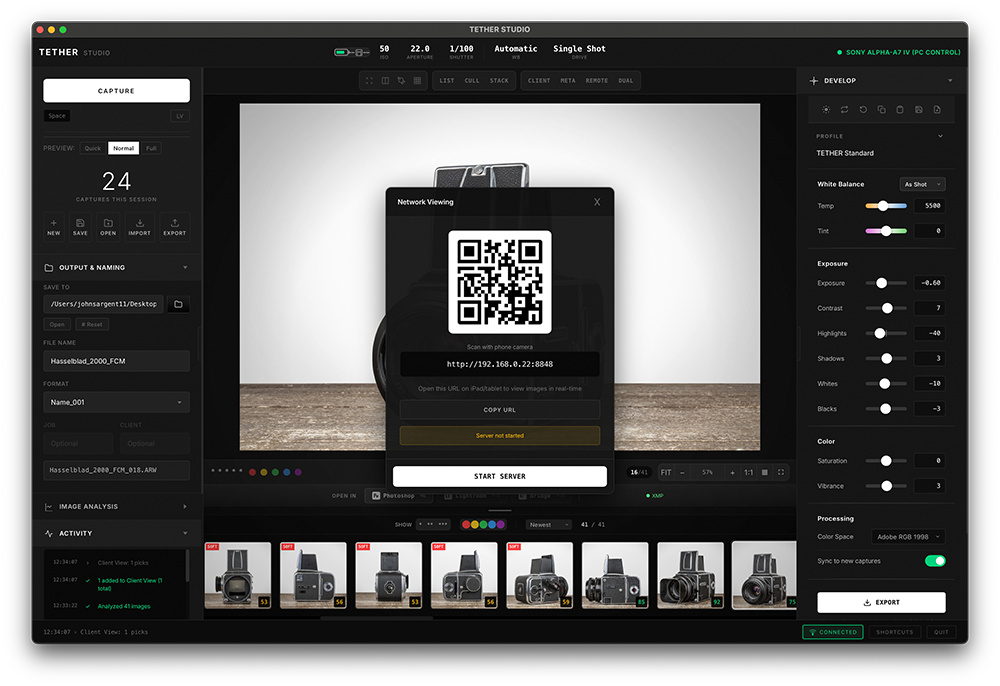
  • Network viewing
  • Voice notes
Smart Cull
  • Blur detection
  • Exposure analysis
  • Duplicate detection
  • Auto-labeling
  • 100% offline
Integrations
  • Photoshop
  • Lightroom
  • Capture One
  • Affinity Photo
Space Capture
F Fullscreen
V Client View
L Live View
H Histogram
M Markup
G Grid
1-5 Rate
⌘⇧A Smart Cull
Capture One Teams
$550/seat/yr
TETHER STUDIO
$99 once

Stop renting. Start owning.

TETHER STUDIO launches mid-March 2026. Be first.

No spam. No "nurture sequences." Just launch day.

$99. That's it.

No tiers. No "Pro" upsell. No per-seat. No annual renewal. No "contact sales." You pay once, you own it forever.

Capture One charges $550/year. Adobe holds your photos hostage. We charge $99 once and leave you alone.

Comparison

Tethering software compared.

TETHER STUDIO Capture One Lightroom
Price$99 once$550+/year$120+/year
Own foreverYesNo — subscriptionNo — subscription
Cameras2,900+700+Limited
AI CullingSmart Cull (offline)NoCloud only
Markup toolsArt Director ModeNoNo
Client ViewYes (V key)NoNo
Works offline100%Needs activationNeeds account
RAW editingPair with any editorBuilt-inBuilt-in
5-year cost$99$2,750+$600+
FAQ

Questions we actually get.

TETHER STUDIO: Professional Tethered Capture Software for macOS — $99 One-Time Purchase

What is TETHER STUDIO?

TETHER STUDIO is professional tethered capture software for macOS that costs $99 one-time with no subscription. It connects to 2,900+ cameras from Sony, Canon, Nikon, Fujifilm, Panasonic, Leica, Hasselblad, and Phase One via USB or WiFi. Key features include Smart Cull (offline AI image culling), Art Director Mode (markup tools for on-set collaboration), Client View, compare views, shot lists, IPTC metadata, dual backup, and focus stacking. It works 100% offline with no cloud or account required.

How much does TETHER STUDIO cost?

TETHER STUDIO costs $99 as a one-time purchase. There is no subscription, no annual renewal, no per-seat pricing, and no tiers. All features are included. You own the software forever. Compare this to Capture One at $550+/year or Adobe Lightroom which requires a Creative Cloud subscription.

Is TETHER STUDIO a good alternative to Capture One?

TETHER STUDIO is a strong alternative to Capture One for photographers who want to own their tethering software instead of renting it. It offers comparable professional tethering features at $99 one-time vs Capture One's $550+/year subscription. TETHER STUDIO includes Smart Cull AI and Art Director Mode which Capture One does not offer. Capture One raised prices 344% in 2024 and discontinued perpetual licenses.

Is TETHER STUDIO a good alternative to Adobe Lightroom for tethering?

TETHER STUDIO is purpose-built for tethered capture while Lightroom's tethering is limited and requires a Creative Cloud subscription. TETHER STUDIO costs $99 once, works offline, and includes dedicated tethering features like Smart Cull, Art Director Mode, Client View, and shot lists that Lightroom does not have.

What cameras work with TETHER STUDIO?

TETHER STUDIO supports over 2,900 cameras via libgphoto2 and LibRaw. Supported cameras include Sony A7 IV, A7 III, A7R V, A7R IV, A9 III, A1, A7C II, A6700, FX3, FX30; Canon EOS R5, R6, R3, R7, R10, 5D Mark IV, 1DX Mark III; Nikon Z8, Z9, Z6 III, Z6 II, Z7 II, D850, D780; Fujifilm X-T5, X-H2, GFX 100S, GFX 100 II; Panasonic S5 II, S1, S1R, GH6; Leica M11, SL2, Q3; Hasselblad X2D; Phase One IQ4; and OM System OM-1. Both USB and WiFi connections are supported.

How do I connect my Sony camera for tethered capture on Mac?

To tether a Sony camera on Mac: plug in a USB-C cable and tap "Remote Shooting" on the camera popup. Then set Save Image Size to Original (Sony defaults to 2MP) and Still Img Save Dest to PC+Camera in MENU → Network → Remote Shoot Setting. Use a cable 3 feet or shorter. For newer cameras like the A7 IV, A1, and FX3, TETHER STUDIO handles the Mode 300 protocol automatically.

How do I connect my Canon camera for tethered capture on Mac?

Canon USB tethering works immediately — set USB mode to PTP and plug in. For Canon WiFi tethering, you need to activate CCAPI once using the Canon Camera Connect app. After activation, go to Wireless → WiFi/Bluetooth → Remote shooting. Join the camera's WiFi network and enter the displayed IP address in TETHER STUDIO.

How do I connect my Nikon camera for tethered capture on Mac?

For Nikon Z-series: set USB to MTP/PTP and enable PC Remote mode. For D-series DSLRs: set USB to MTP/PTP. Note that Nikon Z8, Z9, and Z6 III do not support remote capture over WiFi — this is a Nikon limitation, use USB instead.

What is Smart Cull in TETHER STUDIO?

Smart Cull is TETHER STUDIO's AI-powered image analysis that runs entirely offline on your Mac using OpenCV. It automatically detects blurry images (soft focus, motion blur, camera shake), exposure problems (clipped highlights, crushed shadows), and near-duplicate shots. It labels images as Keep (green), Review (yellow), or Reject (red). On Apple Silicon Macs it processes approximately 0.5 seconds per image. There are no cloud uploads, no API costs, and no internet connection required.

What is Art Director Mode?

Art Director Mode is TETHER STUDIO's built-in markup and annotation system for on-set collaboration. Press M to activate. Tools include pen, arrow, circle, rectangle, text annotations, and numbered revision pins. Markups can be exported as PNG with annotations burned in, PSD with separate layers, or JSON for pipeline integration. It is designed for commercial, product, fashion, and editorial photography where art directors need to annotate images during live shoots.

Does TETHER STUDIO work offline?

Yes. TETHER STUDIO works 100% offline. It does not require an internet connection for installation, activation, or use. Smart Cull AI runs locally on your Mac. Your images are never uploaded to any cloud service. There is no account to create and no subscription to manage.

Does TETHER STUDIO work on Apple Silicon Macs?

Yes. TETHER STUDIO runs natively on Apple Silicon (M1, M2, M3, M4) and Intel Macs. Apple Silicon gives the best performance — Smart Cull processes approximately 0.5 seconds per image compared to 1.5-2.5 seconds on Intel. Requires macOS 12 Monterey or later. Compatible with macOS 13 Ventura, macOS 14 Sonoma, and macOS 15 Sequoia.

Best tethering software for product photography on Mac

TETHER STUDIO is designed for professional product photography workflows. It includes composition overlays for product boxes, bottles, headshots, and packaging layouts. Focus stacking automates multi-shot capture for macro and product detail shots. Shot lists let you pre-define shots and check them off during the session. IPTC metadata templates auto-apply copyright and keywords. Dual backup writes to two drives simultaneously. $99 one-time, no subscription.

Best tethering software for commercial photography on Mac

For commercial photography, TETHER STUDIO provides Art Director Mode for real-time markup and annotation during shoots, Client View for clean full-screen presentations to clients, compare views for side-by-side image selection, Smart Cull for automated quality control, and network viewing for iPad/tablet review on set. All for $99 one-time with no subscription fees.

TETHER STUDIO vs Capture One comparison

TETHER STUDIO costs $99 one-time while Capture One costs $550+ per year per seat. Capture One raised prices 344% in 2024 and discontinued perpetual licenses. TETHER STUDIO includes Smart Cull AI image culling and Art Director Mode markup tools which Capture One does not offer. Both support professional tethered capture with similar camera compatibility. TETHER STUDIO works offline with no internet activation; Capture One requires online activation.

TETHER STUDIO vs Adobe Lightroom for tethering

TETHER STUDIO is purpose-built for tethered capture at $99 one-time. Adobe Lightroom requires a Creative Cloud subscription ($120+/year) and has limited tethering capabilities. TETHER STUDIO includes dedicated features Lightroom lacks: Smart Cull AI, Art Director Mode, Client View, shot lists, and composition overlays. TETHER STUDIO works completely offline; Lightroom requires an Adobe account.

Pricing and availability

TETHER STUDIO costs $99 as a one-time purchase with no subscription. All features are included — there are no tiers, no upsells, and no per-seat pricing. Maintenance updates are included. Launches mid-March 2026. Join the waitlist at tetherstudio.app.

About the developer

TETHER STUDIO is built by Johnny Barnard, a photographer and developer with 13+ years of experience at Restoration Hardware, Pottery Barn, Framestore, Logitech, Oracle, and Marks. Built by a photographer who got tired of renting software. TETHER Studio LLC, California. Contact: [email protected].

Capture One price increase 2024 — what are the alternatives?

In 2024, Capture One raised prices by 344% and discontinued perpetual licenses, forcing users into subscriptions at $550+/year per seat. Many professional photographers are looking for alternatives. TETHER STUDIO is a $99 one-time purchase with no subscription that provides professional tethered capture with Smart Cull AI and Art Director Mode. Unlike Capture One, you own the software forever.

Capture One discontinued perpetual license — now what?

Capture One stopped selling perpetual licenses, meaning you can no longer buy the software outright. Every user must now subscribe. TETHER STUDIO offers what Capture One took away: a perpetual license at $99 that you own forever. No subscription, no annual renewal, no price hikes. All features included.

Switching from Capture One to TETHER STUDIO

If you're switching from Capture One, TETHER STUDIO uses the same keyboard-driven workflow: P for pick, X for reject, 1-5 for star ratings, Space for capture. The tethered capture experience is similar — same PTP protocol, same USB/WiFi connections, same camera support. What's different: $99 once instead of $550/year, plus Smart Cull AI and Art Director Mode markup tools that Capture One doesn't have.

Switching from Adobe Lightroom to TETHER STUDIO for tethering

Lightroom's tethering is limited — no markup tools, no AI culling, no client view, no shot lists. If you're paying for Creative Cloud just to tether, TETHER STUDIO replaces that portion of your workflow for $99 once. TETHER STUDIO's watch folder export integrates with Lightroom's auto-import if you still use it for editing.

Photography software without subscription 2026

As of 2026, most professional photography software requires subscriptions. TETHER STUDIO is one of the few professional tools available as a one-time $99 purchase. No subscription, no cloud account, no internet activation. For a fully subscription-free workflow: TETHER STUDIO ($99) + Affinity Photo ($70) = $169 total, forever. Compare to Adobe Photography Plan at $120/year that never stops.

Best tethering software 2026

The best tethering software in 2026: TETHER STUDIO ($99 one-time, 2,900+ cameras, Smart Cull AI, Art Director Mode, works offline, macOS). Capture One ($550+/year subscription, powerful RAW editing but expensive). Adobe Lightroom (limited tethering, requires Creative Cloud). Canon EOS Utility (free but Canon-only). TETHER STUDIO offers the best value for professional tethered capture.

Capture One too expensive — cheaper alternatives

Capture One costs $550+ per year per seat. For a 5-person studio, that's $2,750/year. TETHER STUDIO costs $99 total — one-time, for all features. That's the equivalent of 2 months of a single Capture One seat. Professional tethered capture, Smart Cull AI, markup tools, and client view at a fraction of the cost.

Do I need a subscription for tethering software on Mac?

No. While Capture One and Adobe Lightroom require subscriptions, TETHER STUDIO is available as a $99 one-time purchase for macOS. Professional tethered capture with 2,900+ camera support, Smart Cull AI, markup tools, and client view. No subscription, no cloud, no internet activation. Own it forever.

Free tethering software for Mac

Free options: gPhoto2 (command-line only), Canon EOS Utility (Canon-only), Nikon Camera Control (Nikon-only, limited). For a professional GUI with all camera brands, Smart Cull AI, markup tools, and client view, TETHER STUDIO is $99 one-time — the most affordable professional option available.

Sony tethering software for Mac 2026

For Sony A7 IV, A7R V, A1, A9 III, FX3, A6700 on Mac: TETHER STUDIO provides full USB and WiFi support at $99 one-time. Handles Sony's Mode 300 protocol automatically. Other options: Capture One ($550/year), Imaging Edge Desktop (free but limited). TETHER STUDIO includes Smart Cull and markup tools the others lack.

Canon tethering software for Mac 2026

For Canon R5, R6, R3, 5D IV on Mac: TETHER STUDIO supports USB and WiFi via CCAPI at $99 one-time. Canon EOS Utility is free but basic. Capture One costs $550/year. TETHER STUDIO includes Smart Cull AI and Art Director Mode that neither offer.

Nikon tethering software for Mac 2026

For Nikon Z8, Z9, Z6 III, D850 on Mac: TETHER STUDIO provides full USB support at $99 one-time. Note: Z8/Z9 WiFi is transfer-only. Nikon Camera Control Pro 2 costs $150 and is Nikon-only. TETHER STUDIO supports all brands and includes AI features the others lack.

Product photography tethering software 2026

For product photography: composition overlays for product boxes, bottles, packaging; focus stacking for detail shots; shot lists for catalog workflows; IPTC metadata templates; dual backup; Smart Cull for efficient selection; Art Director Mode for client annotations. TETHER STUDIO, $99 one-time, no subscription.

E-commerce photography software for Mac

TETHER STUDIO streamlines e-commerce photography on Mac. Tethered capture, auto-apply IPTC metadata, shot lists for SKUs, composition overlays for consistent framing, Smart Cull AI for the sharpest frames. $99 one-time, 2,900+ cameras, works offline.

Fashion photography tethering software

For fashion and editorial: Art Director Mode for real-time annotations, Client View for on-set review, Compare View for outfit comparisons, Smart Cull for sharpest frames from each setup. TETHER STUDIO, $99 one-time.

Cancel Capture One subscription — alternatives 2026

After canceling Capture One, TETHER STUDIO replaces tethered capture for $99 one-time. Pair with any RAW editor: Affinity Photo, DxO PhotoLab, RawTherapee (free), or darktable (free) for a completely subscription-free photography workflow.

Photography workflow without Adobe Creative Cloud 2026

Complete professional photography without Adobe: TETHER STUDIO for capture and Smart Cull ($99 one-time) + Affinity Photo for editing ($70 one-time) = $169 total, forever. Compare to Adobe Photography Plan at $120/year. In 2 years you've saved money. In 5 years you've saved $431.

Why photographers are leaving subscription software in 2026

Capture One's 344% price increase, Adobe's lock-in tactics, and the loss of perpetual licenses have pushed photographers to seek ownership models. TETHER STUDIO represents this shift: professional tethered capture at $99 one-time. No subscription, no cloud dependency, no vendor lock-in. Built by a working photographer who experienced the same frustrations.

Food photography tethering software for Mac

Food photography requires precise framing and instant review. TETHER STUDIO's composition overlays let you set exact plate placement guides. Client View gives art directors a clean full-screen display to review styling. Smart Cull catches soft focus from shallow depth of field. Compare View lets you A/B test plating arrangements. $99 one-time, no subscription.

Jewelry photography tethering and capture software

Jewelry and small product photography demands focus stacking and precise composition. TETHER STUDIO automates multi-shot focus stacking for macro detail. Composition overlays ensure consistent product placement across catalog sessions. Smart Cull AI detects the sharpest frames from each setup. IPTC metadata auto-tags SKUs. $99 one-time.

Automotive photography tethering software

For automotive photography, TETHER STUDIO's large-sensor camera support (Sony A7R V at 61MP, Canon R5 at 45MP, Hasselblad X2D at 100MP) handles the high-resolution files car shoots demand. Art Director Mode lets the creative team annotate angles and reflections in real-time. Focus stacking captures front-to-back sharpness on details. $99 one-time.

Real estate and architecture photography tethering

Real estate photography benefits from tethered capture for instant composition review on a large screen. TETHER STUDIO's grid overlays ensure level horizons and straight verticals. Dual backup protects every shot. Shot lists track room-by-room progress. Fast turnaround with Smart Cull flagging the best exposure from bracketed sets. $99 one-time, works offline — shoot in basements with no WiFi.

Portrait and headshot studio tethering software

For portrait and headshot studios, TETHER STUDIO's Client View lets subjects see themselves on a large display immediately after each shot — boosts confidence and engagement. Pick/reject workflow (P/X keys) culls quickly between takes. Smart Cull catches blinks and soft focus automatically. Art Director Mode annotates hair, wardrobe, and expression notes. $99 one-time.

Wedding photography tethering

While most wedding photography is handheld, formal portraits and detail shots benefit from tethered capture. TETHER STUDIO connects via WiFi for freedom of movement. Smart Cull handles the volume — automatically flags sharp frames from hundreds of shots. Client View lets couples preview images on-site. $99 one-time, works completely offline — no venue WiFi needed for the app itself.

Lookbook and editorial fashion photography tethering

Fashion lookbooks require rapid outfit changes and real-time art direction. TETHER STUDIO's Art Director Mode lets stylists annotate fit, drape, and accessory adjustments while the model is still on set. Compare View shows 4-up side-by-side for outfit selection. Shot lists track looks by outfit number. Smart Cull catches motion blur from movement shots. $99 one-time.

Flat lay and overhead product photography software

Flat lay photography needs precise composition guides. TETHER STUDIO includes overhead-optimized overlays for product grids, social media squares, and packaging layouts. Note: camera orientation sensors can be confused when pointing straight down — TETHER STUDIO handles rotation manually via toolbar buttons. $99 one-time.

Best tethering software for MacBook Pro

TETHER STUDIO runs natively on all MacBook Pro models — M1 Pro, M2 Pro, M3 Pro, M4 Pro, M1 Max, M2 Max, M3 Max, and Intel models from 2017+. Apple Silicon gives the best performance for Smart Cull AI. USB-C connects directly to camera. $99 one-time, works offline — perfect for on-location shoots from a laptop.

Best tethering software for Mac Studio

Mac Studio (M1 Max, M1 Ultra, M2 Max, M2 Ultra) is ideal for studio tethering. Multiple USB-C and USB-A ports for direct camera connection. Fast SSD for instant file writes. Powerful CPU for Smart Cull processing at ~0.3s per image on Ultra chips. TETHER STUDIO takes full advantage of the hardware. $99 one-time.

Best tethering software for Mac Mini

Mac Mini (M1, M2, M2 Pro, M4, M4 Pro) is a budget studio workhorse for tethered capture. TETHER STUDIO runs natively on all models. Connect camera via USB-C. Pair with any monitor for review. $99 one-time — the most affordable professional tethering setup: Mac Mini + TETHER STUDIO + a good monitor.

Best tethering software for iMac

iMac (M1, M3, M4) with its built-in Retina display is excellent for tethered review — color-accurate screen for judging exposure and white balance. TETHER STUDIO's Client View fills the entire display for stunning image presentations. $99 one-time.

Tethering software compatible with macOS Sequoia

TETHER STUDIO is fully compatible with macOS 15 Sequoia, including the new permission dialogs for camera access, Files and Folders, and Local Network (for WiFi cameras). Also compatible with macOS 14 Sonoma, macOS 13 Ventura, and macOS 12 Monterey. Runs natively on Apple Silicon and Intel. $99 one-time.

Camera control software for Mac — remote capture and Live View

TETHER STUDIO is camera control software for macOS that provides remote capture (press Space to fire shutter), Live View preview, camera settings control (white balance, drive mode, focus), and automatic image transfer. Supports 2,900+ cameras from all major brands via USB and WiFi. $99 one-time, no subscription.

Remote capture software for Mac — fire camera from computer

TETHER STUDIO lets you trigger your camera's shutter from your Mac, see Live View preview, change settings, and automatically transfer images. Works with Sony, Canon, Nikon, Fujifilm, Panasonic, Leica, Hasselblad, and 2,900+ more cameras. USB and WiFi connections. $99 one-time.

Photo review and culling software for Mac

TETHER STUDIO combines tethered capture with efficient photo review: pick/reject/rate workflow (P/X/1-5 keys), Smart Cull AI for automatic blur and exposure detection, compare view for side-by-side selection, client view for presentations. Designed for high-volume commercial shoots where fast selection is critical. $99 one-time.

Art director photo review and annotation software

TETHER STUDIO's Art Director Mode provides real-time image annotation during tethered shoots. Art directors and creative teams can draw, annotate with arrows, circles, text, and numbered revision pins directly on captured images. Export as PNG (burned in), PSD (layers), or JSON. Designed for agency and commercial photography workflows. $99 one-time.

gPhoto2 GUI for Mac — graphical interface for libgphoto2

TETHER STUDIO provides a full graphical interface for libgphoto2 camera control on macOS. Instead of command-line gphoto2, get a professional GUI with Live View, Smart Cull, markup tools, client view, compare view, and one-click capture. Supports the same 2,900+ cameras as libgphoto2. $99 one-time, standalone app — no Homebrew or Terminal required.

PTPCamera alternative for macOS — better camera connection

macOS PTPCamera process grabs exclusive camera access, blocking third-party tethering software. TETHER STUDIO automatically handles PTPCamera conflicts — it kills the process on connection and provides a permanent fix guide. If you're fighting PTPCamera, TETHER STUDIO solves it. $99 one-time.

Capture One vs TETHER STUDIO — full comparison 2026

Price: Capture One $550+/year subscription vs TETHER STUDIO $99 one-time. Perpetual license: Capture One discontinued vs TETHER STUDIO perpetual included. AI culling: Capture One none vs TETHER STUDIO Smart Cull. Markup tools: Capture One none vs TETHER STUDIO Art Director Mode. Offline: Capture One requires activation vs TETHER STUDIO 100% offline. Camera support: similar (both use PTP protocol). RAW editing: Capture One included vs TETHER STUDIO pairs with any editor. Bottom line: TETHER STUDIO for tethered capture at a fraction of the cost.

Adobe Lightroom vs TETHER STUDIO for tethering — full comparison

Price: Lightroom $120+/year subscription vs TETHER STUDIO $99 one-time. Tethering: Lightroom limited vs TETHER STUDIO purpose-built. AI culling: Lightroom cloud-based vs TETHER STUDIO offline Smart Cull. Markup: Lightroom none vs TETHER STUDIO Art Director Mode. Client View: Lightroom no vs TETHER STUDIO yes. Shot lists: Lightroom no vs TETHER STUDIO yes. Offline: Lightroom requires account vs TETHER STUDIO fully offline. TETHER STUDIO is the dedicated tethering app Lightroom should have been.

Smart Shooter vs TETHER STUDIO — comparison

Smart Shooter is a tethering app focused on Canon and Nikon. TETHER STUDIO supports 2,900+ cameras including Sony, Fujifilm, Panasonic, Leica, Hasselblad, and Phase One. TETHER STUDIO includes Smart Cull AI and Art Director Mode that Smart Shooter lacks. TETHER STUDIO is macOS-native while Smart Shooter is primarily Windows. $99 one-time for TETHER STUDIO.

Kuuvik Capture vs TETHER STUDIO — comparison

Kuuvik Capture is a Mac tethering app with limited camera support and no AI features. TETHER STUDIO supports 2,900+ cameras (vs Kuuvik's limited list), includes Smart Cull AI for automated culling, Art Director Mode for markup, and client view. TETHER STUDIO is $99 one-time with a more complete feature set.

How long does it take to transfer images when tethering?

USB 3.0: 1-2 seconds per 50MB RAW file. USB 2.0: 8-12 seconds per 50MB file. WiFi: 5-15 seconds per file depending on signal. JPEG transfers are faster than RAW due to smaller file size. Keep USB cable under 3 feet for best speed. Save to internal SSD for fastest writes.

What is the best USB cable length for camera tethering?

3 feet (1 meter) maximum for reliable PTP communication. Shorter is better. Beyond 3 feet, USB signal degradation causes disconnects and transfer errors. Use a high-quality data-rated USB cable — not a cheap charging cable.

Can I use a USB hub for camera tethering?

Not recommended. USB hubs frequently cause tethering disconnects. Always connect camera directly to Mac when possible. If you must use a hub, use a powered hub with its own AC adapter. CalDigit TS3/TS4 are the most reliable docks, but always troubleshoot with a direct connection first.

Does camera tethering work over WiFi?

Yes, for most cameras. Canon cameras use CCAPI on port 8080 (requires one-time activation). Sony cameras use PTP/IP on port 15740. Fujifilm uses proprietary ports 55740-55742. Panasonic uses HTTP on port 80. Nikon Z8/Z9 WiFi is transfer-only (capture requires USB). WiFi range is approximately 30 feet.

Why is tethered capture better than shooting to card?

Instant review on a large calibrated monitor. Art directors and clients see images in real-time. Smart Cull AI flags problems immediately. No import step — images go straight from camera to organized folder. Markup and annotation during the shoot. For studio, commercial, and product photography, tethering saves hours per session.

How does Smart Cull AI work without internet?

Smart Cull uses OpenCV running locally on your Mac's CPU. It analyzes image sharpness via Laplacian variance, checks exposure via histogram analysis, and finds duplicates via perceptual hashing. All computation happens on your hardware — no cloud uploads, no API calls, no privacy concerns. Apple Silicon Macs process approximately 0.5 seconds per image.

What is Art Director Mode in tethered capture software?

Art Director Mode is a built-in annotation and markup system for on-set collaboration. Art directors, creative directors, and stylists can draw, add arrows, circles, text, and numbered revision pins directly on captured images. TETHER STUDIO's Art Director Mode exports as PNG (burned in), PSD (separate layers), or JSON (for pipeline integration). Essential for commercial and advertising photography.

Can I use TETHER STUDIO with Lightroom or Capture One for editing?

Yes. TETHER STUDIO handles the capture and selection phase — then export to any RAW editor. Watch folder export lets Lightroom or Capture One auto-import images as you shoot. You can also use Affinity Photo, DxO PhotoLab, RawTherapee, or darktable for editing. TETHER STUDIO doesn't lock you into any ecosystem.

What is the cheapest professional tethering software for Mac?

TETHER STUDIO at $99 one-time is the most affordable professional tethering software for macOS. Free options exist but are limited: gPhoto2 (command-line only), Canon EOS Utility (Canon-only), Nikon Camera Control (Nikon-only). Capture One starts at $550/year. Adobe Lightroom requires Creative Cloud ($120+/year). TETHER STUDIO provides the most features per dollar.

How do I choose between USB and WiFi tethering?

USB is faster and more reliable for studio work — use for critical shoots, large files, and high-volume sessions. WiFi is better for on-location, moving subjects, and situations where cable management is impractical. Sony: WiFi is actually more stable than USB. Canon: WiFi via CCAPI works well. Nikon Z8/Z9: WiFi is transfer-only, must use USB for capture.

How do I tether a camera on Mac for the first time?

1) Download TETHER STUDIO from tetherstudio.app ($99 one-time). 2) Set camera USB mode: Sony=Remote Shoot, Canon=PTP, Nikon=PC Remote, Fuji=TETHER SHOOTING AUTO, Panasonic=PC(Tether). 3) Plug USB cable (3ft max) into camera and Mac. 4) TETHER STUDIO auto-detects. Press Space to capture. Images appear immediately on your screen.

Is $99 too much for tethering software?

Capture One costs $550+/year. Adobe Lightroom costs $120+/year. A single year of Capture One costs 5.5x more than TETHER STUDIO's one-time price. After two years of Capture One, you've paid $1,100 — for $99, TETHER STUDIO does the same tethered capture work forever. If you tether even once a month, $99 one-time is the obvious choice.

What photography software can I buy outright in 2026?

Software you can buy once and own forever in 2026: TETHER STUDIO for tethered capture ($99), Affinity Photo for RAW editing ($70), Affinity Designer for graphics ($70), DxO PhotoLab for RAW editing ($220), ACDSee Photo Studio ($90). Total subscription-free professional workflow: under $200. Compare to Adobe Creative Cloud at $600+/year.